Why I run my own mail server on Oracle Cloud (and what it taught me about deliverability)
Self-hosting email with Mailcow: the blocked ports, the DNS records that decide whether you land in spam, and why a marketer should understand all of it.
By Abdul Haseeb
Everyone on the internet will tell you not to run your own mail server. It is hard, it is fiddly, and one wrong DNS record sends every email you write straight to spam.
All true. I did it anyway. The email address on this site, work@abdulhaseeb.info, runs on a mail server I host myself.
This post is partly the why, and partly the list of things I wish someone had told me first. If you run email marketing or lead follow-up, the second half is worth reading even if you never host anything yourself, because the same rules decide whether your emails land.
The setup
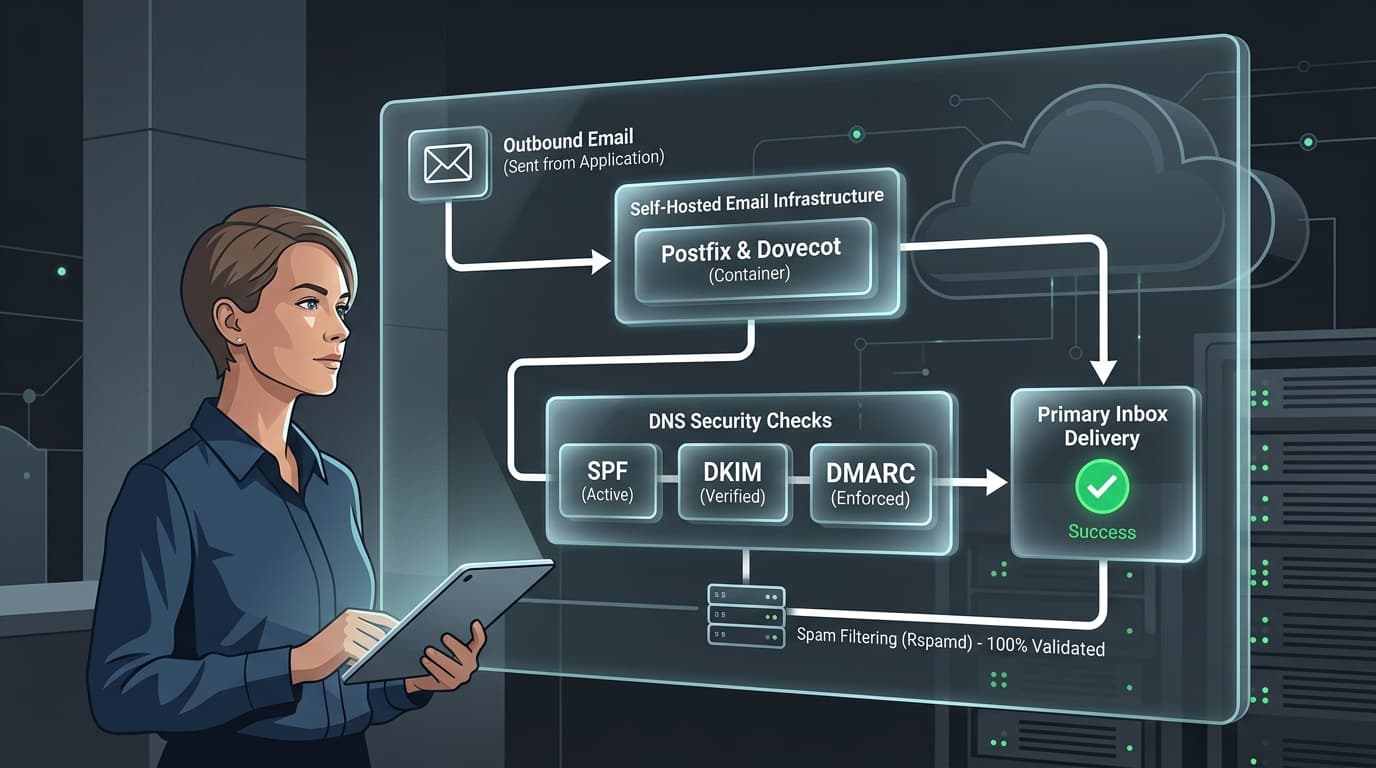
I run three servers on Oracle Cloud. One of them handles mail, using Mailcow, an open source mail server suite that runs in Docker. Mailcow bundles everything a mail server needs: Postfix to send and receive, Dovecot to store mail, Rspamd to filter spam, a webmail client, and an admin panel to manage it all.
The same servers host the MCP servers behind my AI stack and other tools I use for client work.
Why bother?
Honestly, the first reason is that I wanted to understand it properly. I spend a lot of time around lead forms, auto-replies and follow-up emails. Knowing exactly why an email lands in the inbox or in spam is useful knowledge for a marketer, and there is no faster way to learn it than being personally responsible for it.
The practical reasons:
- Ownership. My mailboxes and my data sit on infrastructure I control.
- Cost. It runs on servers I already administer for other work.
- Flexibility. Addresses, aliases and forwarding rules are mine to set up however I like.
Lesson 1: the cloud blocks port 25, and it is right to
The first surprise: Oracle Cloud, like most cloud providers, blocks outbound traffic on port 25, the port mail servers use to talk to each other. Spammers love cheap cloud servers, so providers close this door by default.
Receiving mail works fine. Sending is the problem. The solution is to relay outgoing mail through a proper email delivery service, in my case Oracle's own Email Delivery, which sends on your behalf from infrastructure with a good reputation. Your server still does everything else.
Lesson 2: three DNS records decide whether you exist
Whether a receiving mail server trusts your email comes down to three DNS records. If you send marketing or transactional email from your own domain, you need all three, whoever hosts your mail:
- SPF lists the servers that are allowed to send email for your domain. Mine authorises my own mail server and Oracle's Email Delivery. Anything else claiming to be me fails the check.
- DKIM adds a cryptographic signature to every email, so the receiver can confirm it really came from your domain and was not changed on the way.
- DMARC tells receivers what to do when SPF or DKIM fails, and sends you reports about who is sending email as your domain. Start with a monitoring policy, read the reports, then tighten it.
- 01MailcowWrites and signs it (DKIM)
- 02Oracle Email DeliveryRelay, because port 25 is blocked
- 03Receiving serverChecks SPF, DKIM and DMARC
- 04Inbox or spamDecided by those three
Lesson 3: SPF breaks the moment you forget about it
Here is the trap that catches almost everyone, including me. SPF only authorises the senders you list. If some other system sends email as your domain, for example a website contact form sending through a Gmail account, a CRM, or an email marketing tool, that email fails SPF unless you add it.
Failed SPF does not always mean rejection. It often means quietly landing in spam, which is worse, because nobody tells you. I found exactly this on my own site: the contact form was sending through a service that my SPF record did not authorise. The lesson: every tool that sends email as your domain needs to be accounted for in your DNS. Audit this whenever you add a new tool.
- 01Contact formSends as the domain
- 02Through GmailNot listed in SPF
- 03SPF check failsNo error, no bounce
- 04Spam folderNobody finds out
Lesson 4: reputation is earned slowly
A brand new domain or server has no sending reputation. Big providers are cautious with unknown senders. Send low volumes of genuinely wanted email first, keep bounce rates low, and let the reputation build. This applies just as much to a new domain you have set up for cold outreach.
Would I recommend it?
For most businesses: no. Use a hosted email provider and spend your time on something else. But do learn the lessons, because SPF, DKIM, DMARC and sender reputation apply whoever hosts your mail, and they quietly decide whether your follow-up emails ever get read.
For me, it fits a pattern. I would rather understand a system than rent a black box, which is the same reasoning behind building CrewSpace and self-hosting the AI stack.
More on the infrastructure is in the AI stack chapter. And if you want to test whether my mail server works, send me an email. It does. Probably.